
EasyAccess 2.0 is available for Android devices. With EasyAccess 2.0, users can easily use VNC or cMT Viewer to access remote HMI. Even though the UI and available functionalities on an Android device maybe slightly different from PC, the connection steps are as simple and straighforward.
EasyAccess 2.0 on Android requires Android version 4.1.2 or later.
App Download
In addition to the main app EasyAccess 2.0, a helper OpenVPN Connector app is required. Please download the apps from the App store and install the apps, both of which are free.
 |
EasyAccess 2.0 | https://play.google.com/store/apps/details?id=com.weintek.easyaccess |
 |
OVPN Connector | https://play.google.com/store/apps/details?id=com.weintek.ovpn |
 |
EasyAccessVPN Connector | https://play.google.com/store/apps/details?id=com.weintek.weintekp2p |
Step-by-step connection guide
1. Launch EasyAccess 2.0 app.
2. Enter Domain name, Domain user’s username and password, and then click [Login].
3. Once logged in, the app will list user’s HMIs and their statuses.
4. Click on the connect button to establish connection to an online HMI.”
5. Once connected, the virtual IP address will be displayed. The top status bar will also display a VPN icon. It is now possible to connect directly to the remote HMI by VNC or cMT Viewer.
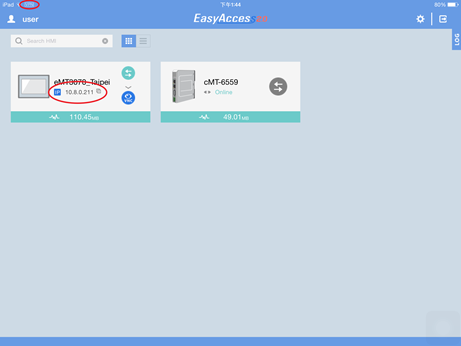
6. When finished, return to EasyAccess 2.0 app and click on the disconnect button to terminate the connection.
Comments
0 comments
Please sign in to leave a comment.